Towards Evaluation Driven Development with MongoDB and HoneyHive

The Step-by-Step Guide to Build Production-Ready RAG Systems with MongoDB and HoneyHive
Retrieval-Augmented Generation (RAG) systems are transforming how we leverage Generate AI to interact with vast knowledge bases. From automating customer support to powering intelligent research and coding assistants, RAG applications are already transforming knowledge work across industries. While prototyping these systems is relatively straightforward today, taking these applications to production remains incredibly challenging. Common issues like hallucinations, irrelevant context, and inaccurate responses can seriously impact the reliability of RAG applications in real-world settings, where data and user behavior continuously evolves.
So, how do you go about building a RAG system that is reliable enough to deploy to production? The answer lies in leveraging the right tools and workflows for systematically improving your application and building confidence with evaluations.
Towards Evaluation Driven Development
In traditional software, Test-Driven Development (TDD) allows us to build robust software through iterative test-first coding. Similarly, Evaluation-Driven Development (EDD) brings this systematic approach to AI, particularly RAG systems, by placing continuous, measurable evaluation at the core of RAG application development:
- Measure to Improve: EDD provides quantitative insights into your RAG system's performance, allowing targeted improvements.
- Pinpoint Failures: It helps identify exactly where your system falls short - in retrieval, generation, or both.
- Guide Iteration: Consistent measurement across components enables data-driven decisions on where to focus development efforts.
- Validate Changes: EDD allows you to quantitatively verify whether changes actually improve performance or cause regressions.
Think of EDD as turning your RAG development into a science experiment. You're constantly measuring, learning, and improving your application based on real data on how your retrieval (RAG) and generation (LLM) steps perform independently.
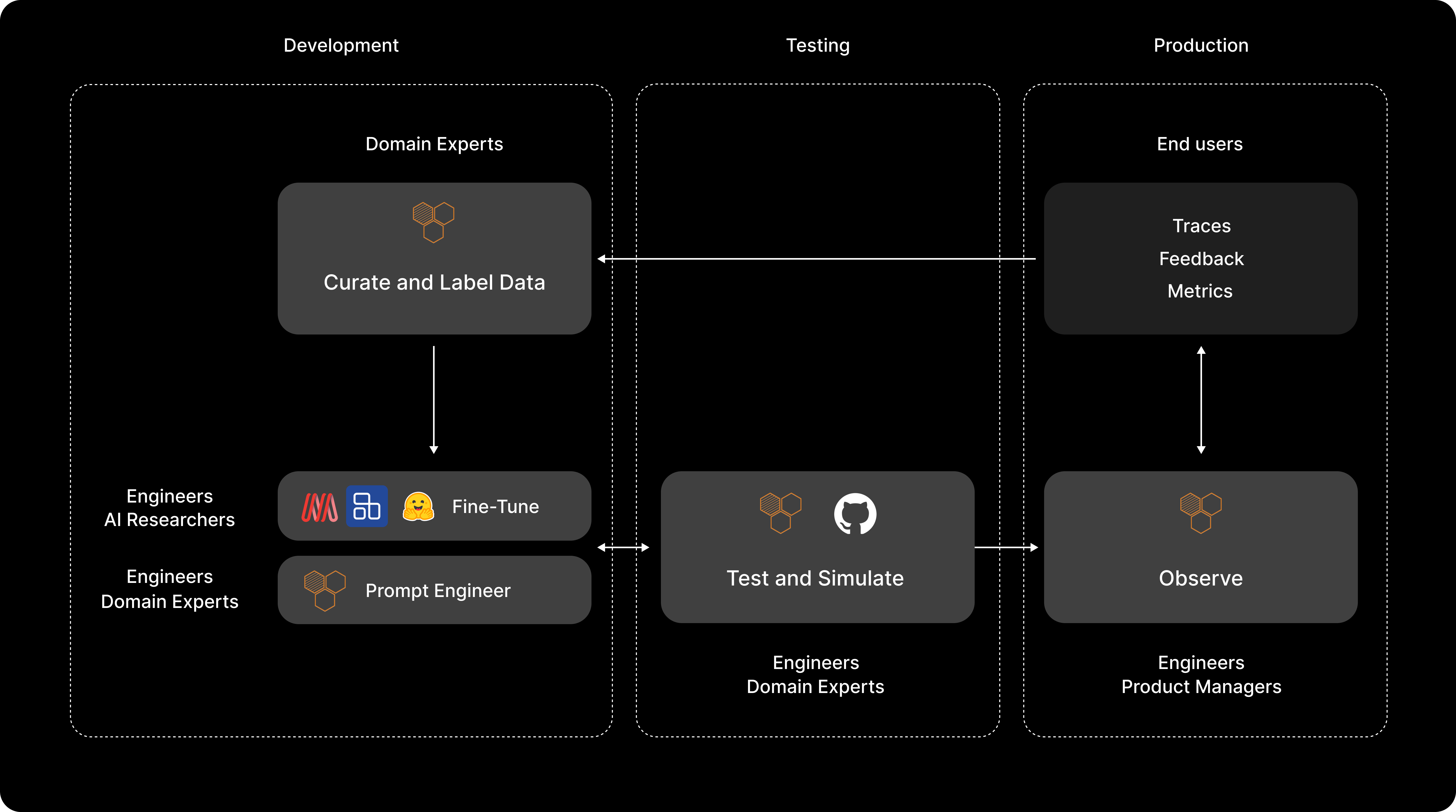
Now, let's look at how MongoDB and HoneyHive can help you put EDD into practice.
Enabling EDD with MongoDB + HoneyHive
HoneyHive is the leading AI evaluation and observability platform for Generative AI applications. Our platform gives developers enterprise-grade tools to debug complex retrieval pipelines, evaluate performance over large test suites, monitor usage in real-time, and manage prompts within a shared workspace. Teams use HoneyHive to iterate faster, detect failures at scale, and deliver exceptional AI products.
MongoDB is a leading document database, offering powerful features like MongoDB Atlas Vector Search. This capability provides scalable and efficient vector storage and retrieval, crucial for large-scale RAG applications. We found MongoDB's flexibility and performance make it an ideal choice for storing and querying vast amounts of data in production.
Together, MongoDB and HoneyHive enable developers to build enterprises-grade RAG applications, systematically improve them through domain-specific evaluations, and deploy to production with confidence. Here’s how:-

Setting up your MongoDB Index
Setting Up the Environment
First, let's set up our environment with the necessary dependencies:
This setup includes LlamaIndex for our RAG system, MongoDB for vector storage, and HoneyHive for tracing, evaluation, and monitoring.
Configuring MongoDB via LlamaIndex
Next, we'll set up our MongoDB connection and configure LlamaIndex:
This configuration sets up our MongoDB Atlas Vector Search as the vector store for our RAG system. We're using OpenAI's text-embedding-ada-002 model, with specific chunk sizes and overlap settings for indexing our embeddings. You can easily change these to run hill-climbing experiments and find the optimal MongoDB configuration for your data.
Loading and Indexing Data
Now, let's load our sample data and create a vector index:
This code loads a PDF document, creates a vector index from it, and sets up a retriever and query engine. The similarity_top_k=5 parameter means our retriever will fetch the top 5 most similar chunks for each query. You can also change this to run multiple experiments and find the optimal cost, latency, and performance tradeoff for your use-case.
Enter HoneyHive: Your Evaluation Framework
Now that we have our RAG system set up with MongoDB, let's explore how HoneyHive can help us evaluate and monitor its performance.
Setting Up HoneyHive
First, we need to configure HoneyHive:
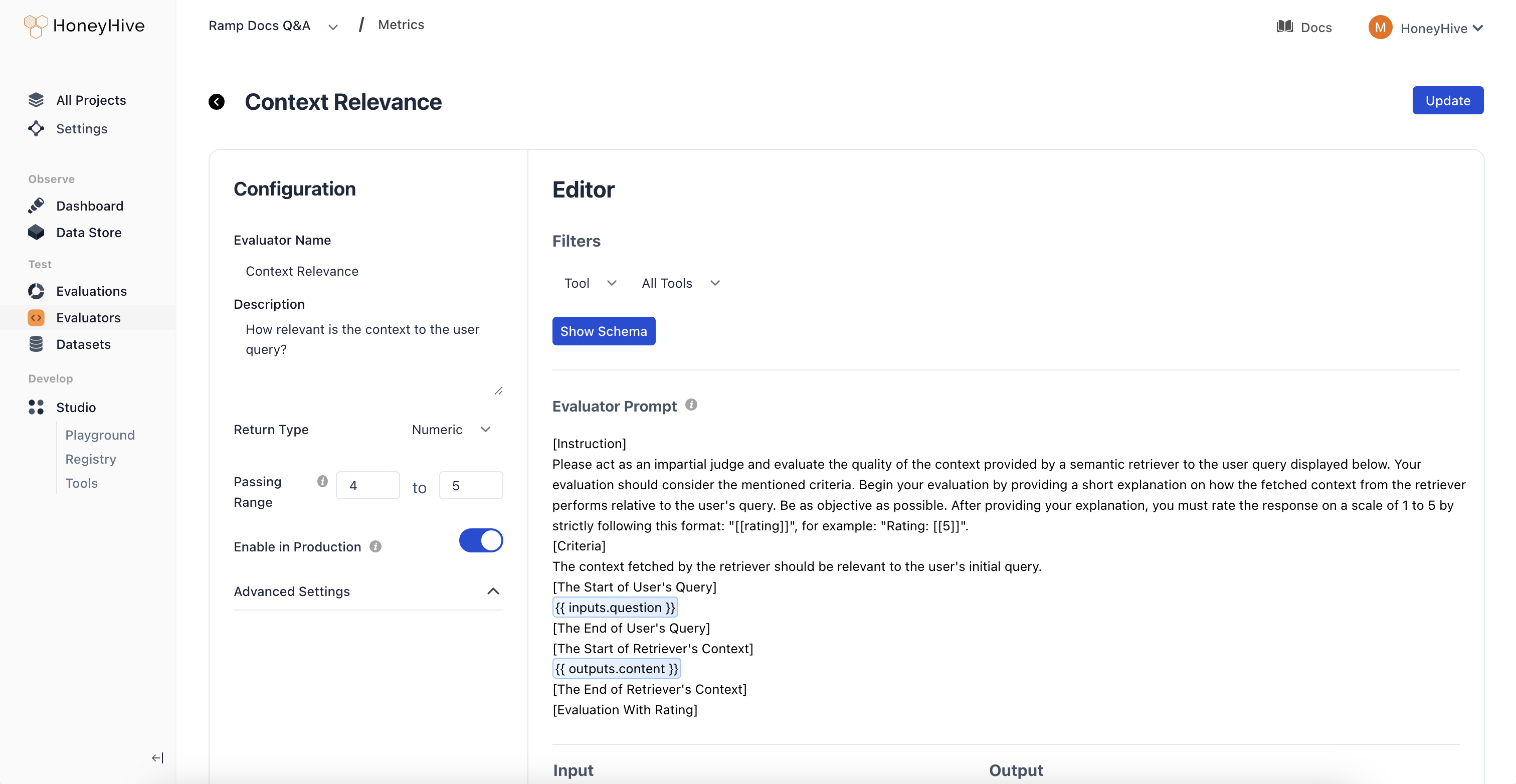
Configuring Evaluators
We'll be setting up the following evaluators in HoneyHive’s console to evaluate our RAG application:
Context Relevance: Rates how relevant the retrieved context chunks are relative to the user query using an LLM. This is used to evaluate the quality of our retrieval step.Answer Faithfulness: Checks if the answer generated by the model is faithful to the context provided to the model using an LLM. This is used to evaluate the quality of our generation step.Answer Relevance: Rates how relevant the model generated answer is relative to the user query using an LLM. This is used to evaluate the quality of our generation step.
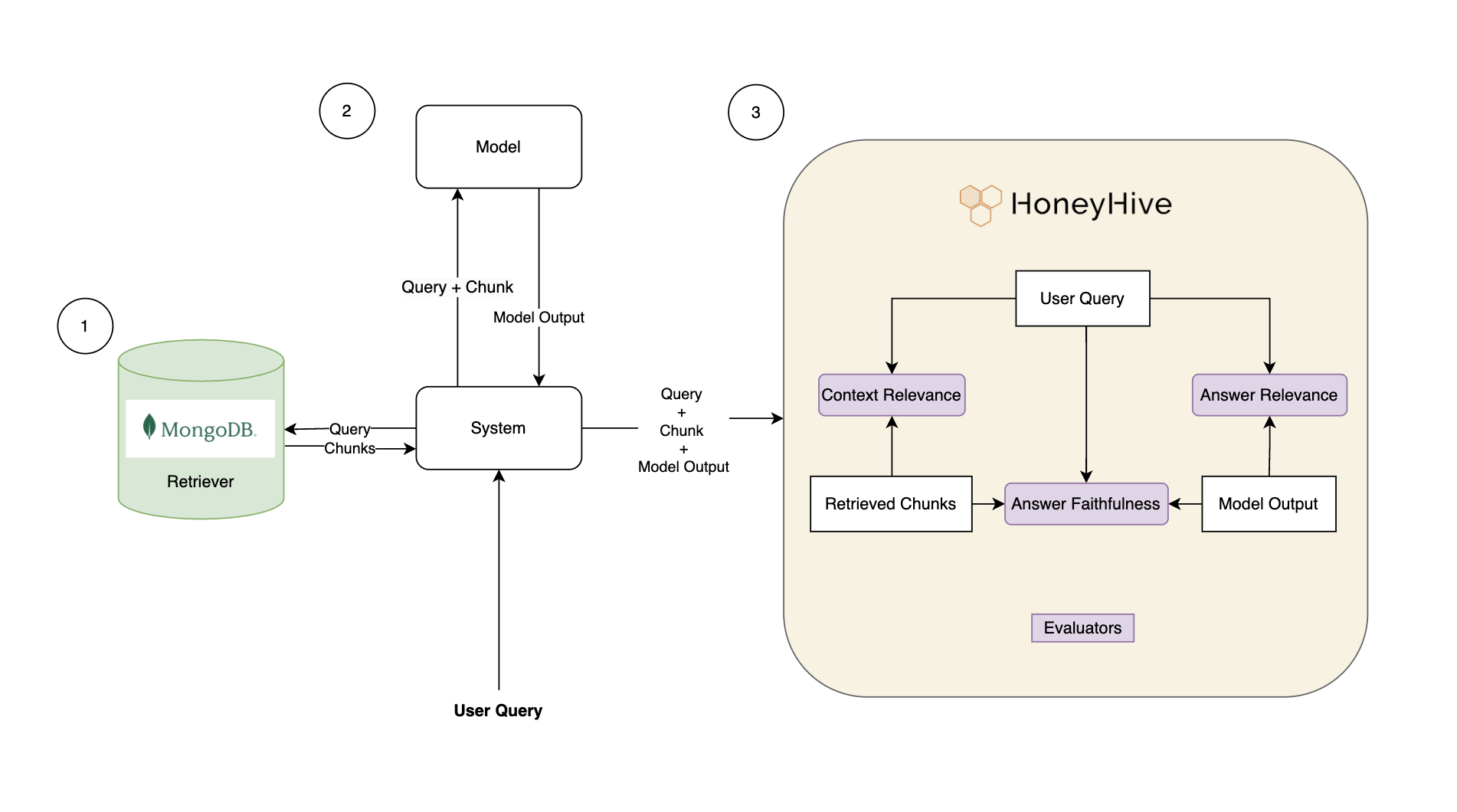
Defining each one of these evaluators separately will allow us to test performance on a fine-grained level and analyze what part of the pipeline needs improvements. Evaluators can be easily defined in the console, further customized based on your domain-specific evaluation criteria, and validated by domain experts within the UI, ensuring perfect alignment.
Setting up our Evaluation Harness
HoneyHive allows us to create datasets for evaluation, explore them within the platform, and leverage them using the SDK to construct your evaluation harness. Here's how we can generate questions from our document and create a dataset:
This code uses LLMs to automatically generate 10 relevant questions from our document index and stores the dataset in HoneyHive. This gives us a structured way to evaluate our RAG system's performance on relevant queries. You can optionally upload your own dataset as well.
Setting up OpenTelemetry Tracing
HoneyHive's SDK uses OpenTelemetry to capture traces and give you granular observability over your RAG application. We can use traces to monitor performance and understand how data flows through our application:
This code sets up tracing for both our retriever and generator calls. Every time we query the system, HoneyHive will track the execution flow along with important metrics and metadata, allowing us to analyze performance in detail.
Running the Evaluation
Finally, let's put it all together and run our evaluation:
This function creates an evaluation run in HoneyHive, traces the retrieval and generation steps, computes metrics to calculate performance on each question in our dataset, and shows us aggregate metrics along with failure rates in the evaluation report.
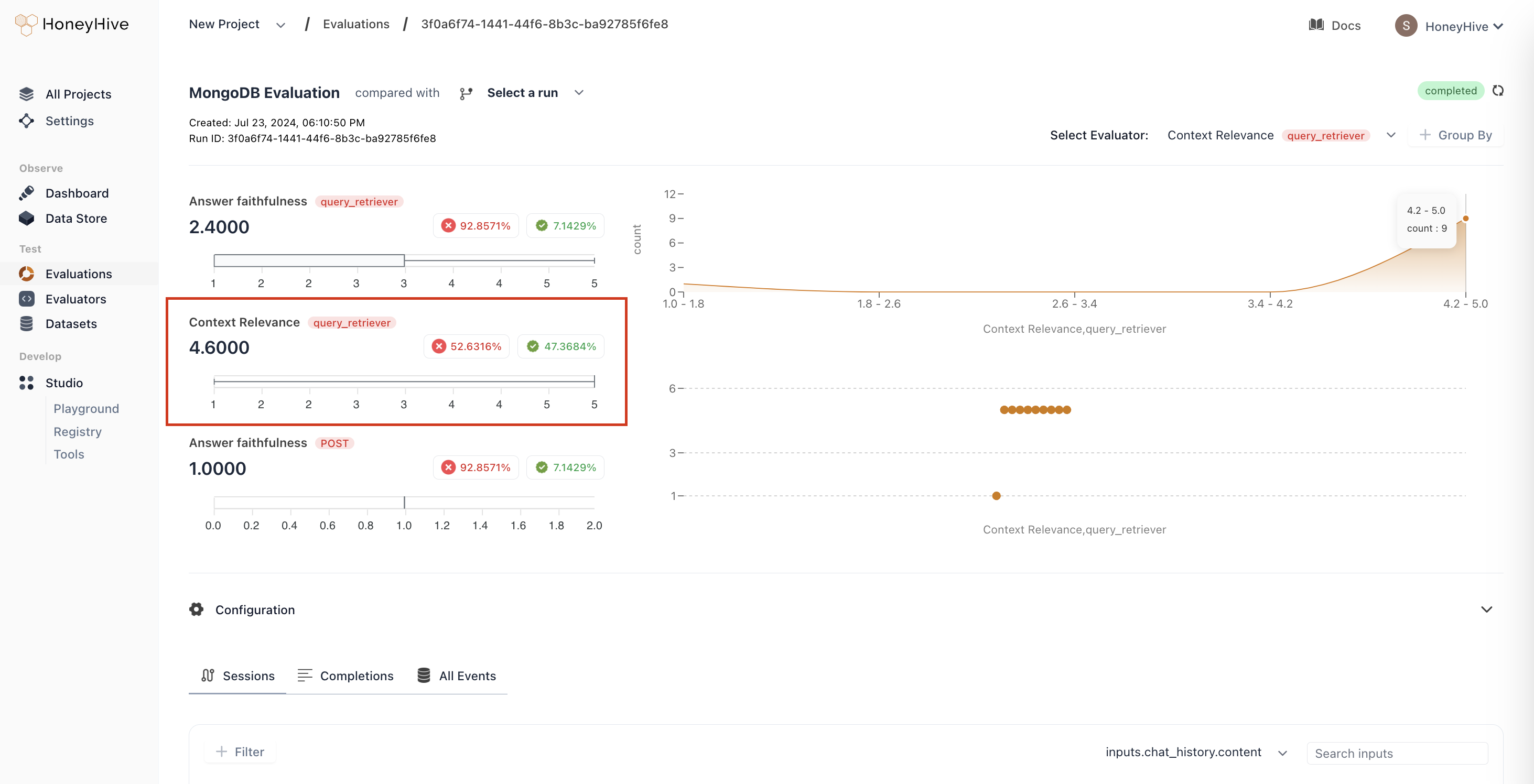
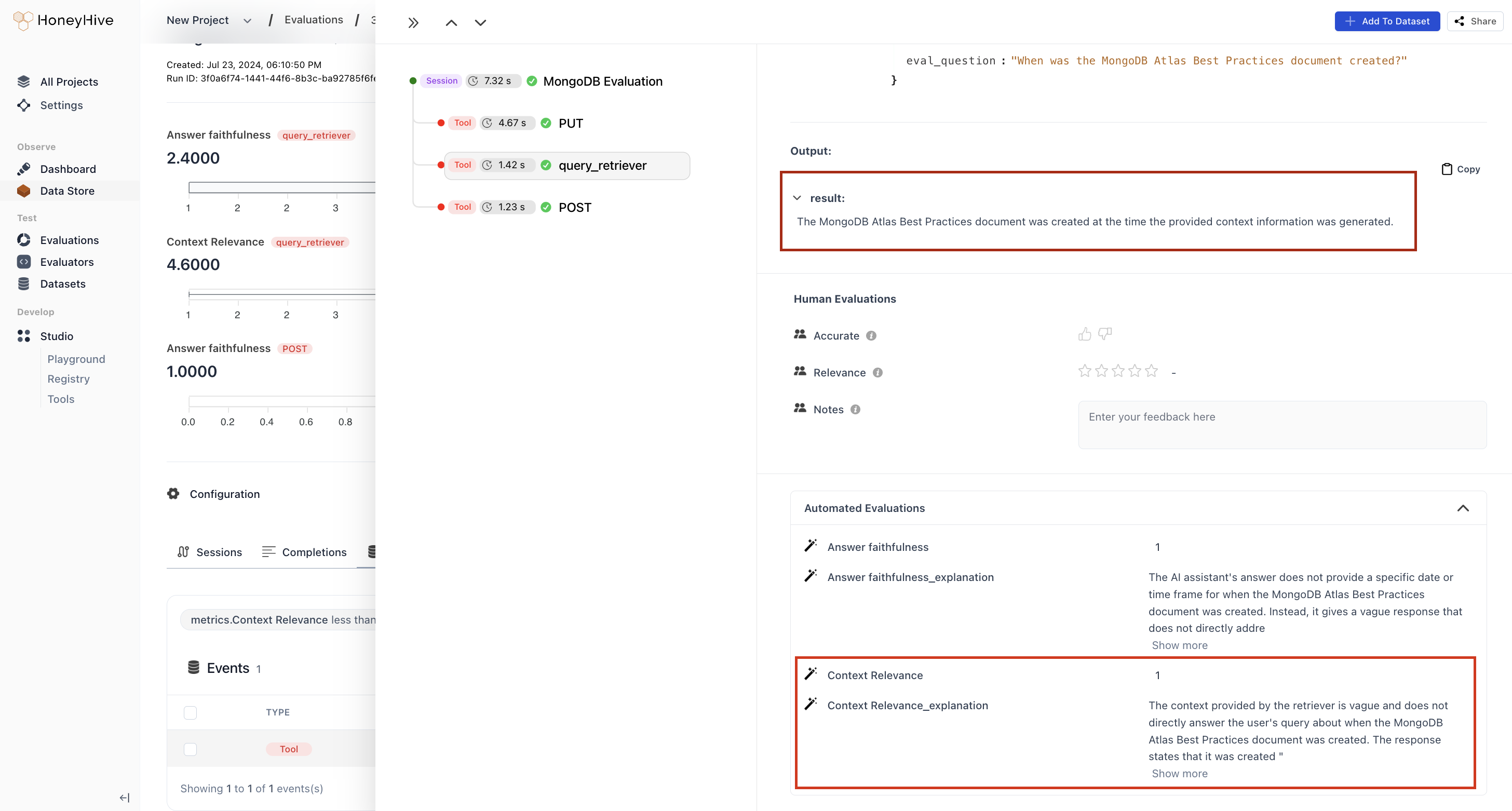
Here, from the snapshot of our evaluation run, we observe that 47% of test cases passed our Context Relevance evaluation, but 53% of test cases failed. To root cause any potential issues in our retrieval pipeline, we can instantly filter for the events that failed our Context Relevance evaluation and analyze explanations generated by the evaluator.
What's Next: Iterative Improvements
Building a reliable RAG application is an ongoing journey of experimentation and improvement. Here’s what you can do to iteratively improve your RAG system:
- Identify and Address Component-Specific Issues:
- Use HoneyHive's evaluation report to pinpoint whether problems stem from the retriever or generator. If your
Answer Faithfulnessscore is low, you need to work on improving your prompt/model. On the other hand, if yourContext Relevancescore is low, you should prioritizing improving your retrieval system first before changing your prompt or your model. - For retriever issues: Adjust query chunks, experiment with embedding models, or modify your RAG architecture (eg: try adding a chunk reranking step).
- For generator issues: Refine prompts and adjust LLM parameters within HoneyHive's Playground.
- Use HoneyHive's evaluation report to pinpoint whether problems stem from the retriever or generator. If your
- Optimize Hyperparameters:
- Leverage HoneyHive to run automated hyperparameter sweeps.
- Find optimal settings for
chunk_size,chunk_overlap, andtop_kparameters in your MongoDB configuration. - Experiment with different LLM settings like
temperatureandmax_tokens.
- Refine Test Suite and Evaluation Criteria:
- Based on evaluation results, guide data collection or curation efforts to improve your evaluation dataset and find more adversarial scenarios.
- Sometimes, evaluators can be imperfect and lead to false negatives. We recommend continuously improving your evaluation criteria to better align with your policies and objectives. This step is crucial in guaranteeing your metrics align with your definition of quality and accuracy.
- Improve your evaluation criteria by adding few shot examples of positive and negative scenarios, keeping in mind that it is best to minimize false negatives.
Remember, the key to a successful RAG system lies in this ongoing process of evaluation, debugging, and improvement. With MongoDB's powerful data capabilities and HoneyHive's comprehensive evaluation tools, you're well-equipped for this iterative journey towards more accurate and reliable AI applications.
By consistently applying these strategies, you can ensure that your RAG application not only meets current needs but evolves to meet future challenges. Happy iterating!