How to Use TypeSafe AI's Jev as an LLM Judge

TypeSafe AI's Jev is a fast, cheap alternative to LLM-as-a-judge for agent evals. When to use it, how to validate it against human labels, and when not to.
TypeSafe released Jev in September 2026 as its first System One model, designed for fast, structured decisions. Its low cost makes it practical to check several aspects of an agent’s work in one request. The tradeoff is that Jev does not explain its answers. To use it as an evaluator, you need to define what you want to check and measure how well its decisions agree with human labels or your existing LLM judge.
What Jev is
A Jev request has two parts: the information to evaluate, called the state, and the questions you want it to answer. The questions define the possible answers, so your code can use the results directly. TypeSafe calls this a System One model, after Kahneman’s fast, intuitive System 1 thinking.
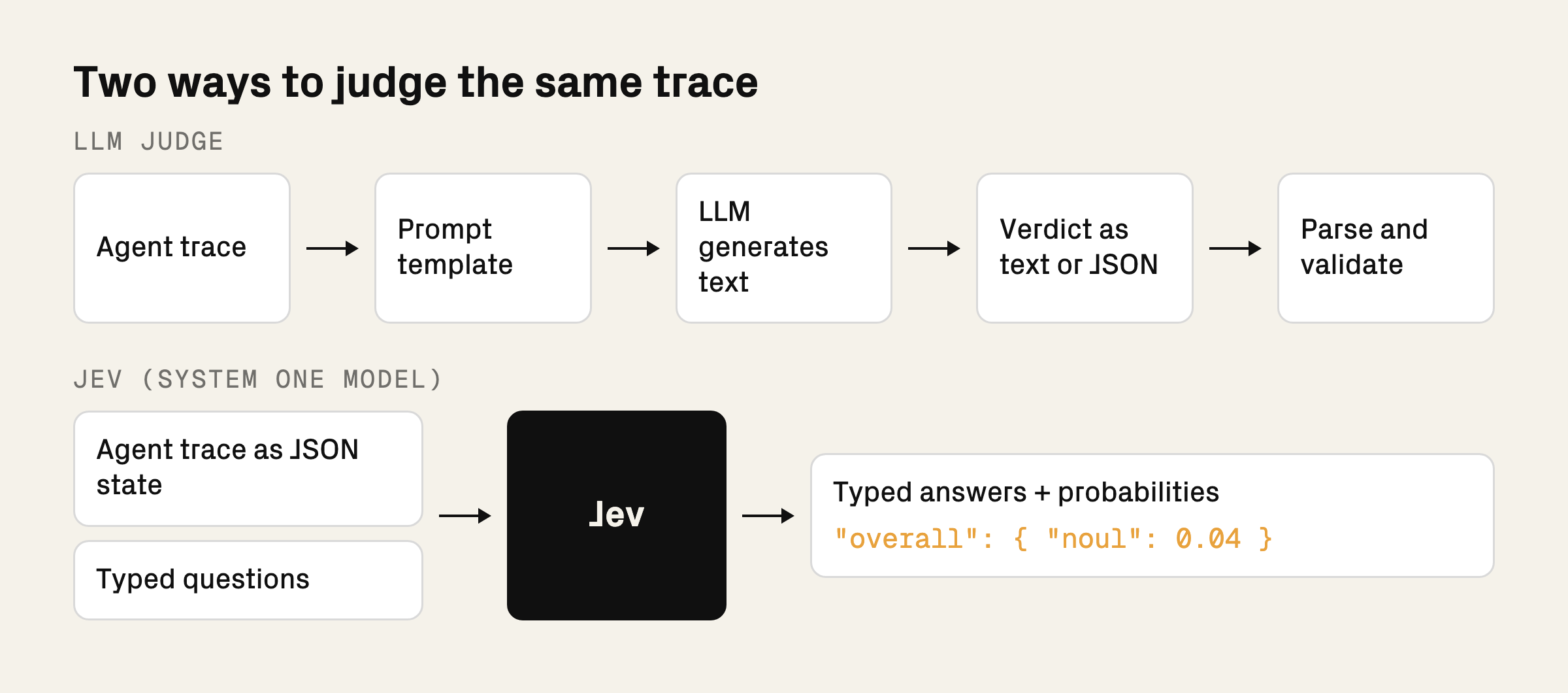
There are three question types, which TypeSafe calls primitives:
- Noul is a yes or no question. It returns the probability that the answer is yes.
- Choice selects one option from a defined set of up to 255. It returns the selected option, a probability for each option, and a confidence value.
- Score rates content against 2 to 10 ordered, descriptive levels you write. It returns a score, a probability for each level, and a confidence value.
The state can be a string, a JSON object, or an array. For agent evals, you might send a full trace, a session summary, or selected tool results. Include the evidence each question needs: a summary may omit details needed to verify a specific action. When using structured data, point each question at the field it should inspect.
Consider a banking support agent. A customer says they were charged twice and asks to speak to a person. The agent replies with instructions for viewing transactions, ignoring the request for human help.
Following the text checks in TypeSafe’s guardrails cookbook, we can ask a reusable Noul question about whether the response addresses the customer’s request:
jev-1.13.0 returned:
That is an 11% probability that the response addresses the customer’s request. Your code can use this answer to flag the exchange for review.
Evaluate several aspects of the same response
A support reply can be easy to understand and still fail to help the customer. We can evaluate the same banking exchange for three things: whether the reply addresses the request, whether it is clear, and whether it shows empathy.
Here is the full request. The customer message and agent response stay the same; we add two questions:
Jev returned these answers:
Each number is the probability of “yes” for that question. Jev gives the reply a 0.78 probability of being clear, but only 0.10 of addressing the request and 0.04 of showing empathy. The reply tells the customer where to find transactions, but does not respond to their request for help with a duplicate charge or acknowledge their situation.
This is why the checks are useful separately: improving the wording alone would not fix the unanswered request. You can track each criterion across support conversations and see which behavior needs attention. These are results from one synthetic exchange; the next step is to check whether the judgments agree with human labels across a dataset.
Align Jev with human judge labels
Before using a Jev answer as a quality metric, compare its decisions with human labels for the same criterion. Start with saved examples of good responses, known failures, and cases where the answer is less obvious.
For the support question above, use human labels indicating whether each response addresses the customer’s request. Include partial answers: a reply might explain a duplicate charge but ignore a request to speak to a person. Make the labeling criteria explicit, then run Jev on the same records.
Inspect the disagreements. Was the question unclear? Did the input omit useful context? Was the human label itself ambiguous? Revise the question or the probability threshold based on what you find. Look at both missed problems and acceptable responses that get flagged, since both affect how useful the evaluator will be.
Keep some human-labeled examples aside while making these changes. Once the evaluator looks useful, check it on those untouched examples before relying on it in production.
Keep the model version fixed too. TypeSafe’s models page notes that jev-latest moves when a release ships. Use the versioned ID you validated, such as jev-1.13.0, and check any proposed upgrade against your human-labeled examples.
Refine the questions and decision rules
When the evaluator disagrees with a human label, inspect the question and the evidence it received before changing the decision rule. Here are a few things to check:
- Use Noul for binary failure checks. Use Score when you can define distinct, meaningful levels. For failure detection, a binary criterion is easier to define and check against human labels than a vague five-level rating. Ask binary questions, then combine them in code if you need a grade.
- Separate recorded facts from semantic judgments. Parse explicit HTTP status codes in code. Use Jev for questions such as whether the final message claims success or whether the evidence supports that claim. Define how retries, partial completion, and missing evidence affect the label.
- Send only the part of the trace the question needs. Filter in code first. If a question is about one customer message and the reply, leave out unrelated conversation history. TypeSafe’s context limit is 64k tokens per request and 32k for state plus the longest question, and irrelevant context can reduce accuracy within those limits.
- Route uncertain answers to review. Add an
unclearoption to a Choice, or treat a Noul probability in a band around 0.5 (say 0.4 to 0.6) as no answer and route it to a human. A Noul always returns a probability; your code decides whether to turn it into a boolean or defer. Tune the review band on labeled examples. - Use confidence for routing rather than validation. Choice and Score answers carry a confidence value. Calibration applies across groups of predictions; it does not guarantee that an individual answer is correct. Send low-confidence cases to review and validate the routing policy on your labels.
- Word each question one way. A Noul and a yes or no Choice can return different probabilities for the same question. Separately asking a question and its negation does not guarantee probabilities that sum to one. Do not carry a threshold from one question type to another.
What not to use Jev for
Use Jev to judge meaning, such as whether a reply addresses a request. Keep exact computations in code, and use other tools for tasks that need generated text or more involved reasoning.
- Exact calculations, counts, or date comparisons. Compute refund totals, count tool calls, and check whether a transaction falls within a time window in code. Jev does not handle these reliably. Do not interpolate between Score levels to recover an exact number, either.
- Writing explanations or free-form answers. Jev is not trained to generate text. Use a generative model when you need a written rationale or customer reply. For extraction, Jev can choose among supplied candidates, but it is not a general-purpose text extractor.
- Questions that require several reasoning steps. Double negatives and indirect questions reduce reliability. Break the decision into direct checks against named fields, then combine the answers in code. Avoid sending a whole conversation history when the relevant exchange is enough.
- An untested security gate for hostile content. Injected instructions or text arguing for its own classification can steer the answer. If you use Jev as a guardrail, test adversarial inputs and use precise criteria; structured output does not make the decision immune to manipulation.
For more on these model-specific behaviors, see Jev 1.13’s jaggedness notes. Revisit them when changing model versions.
For agent evals, two further limits follow from how the evaluator works. Jev will not discover new failure modes for you: start with human error analysis to decide what to check. It also cannot verify events absent from its input. A reply saying “I’ve transferred you” does not prove a handoff happened; that check needs evidence from the support system.
Run Jev as an evaluator in HoneyHive
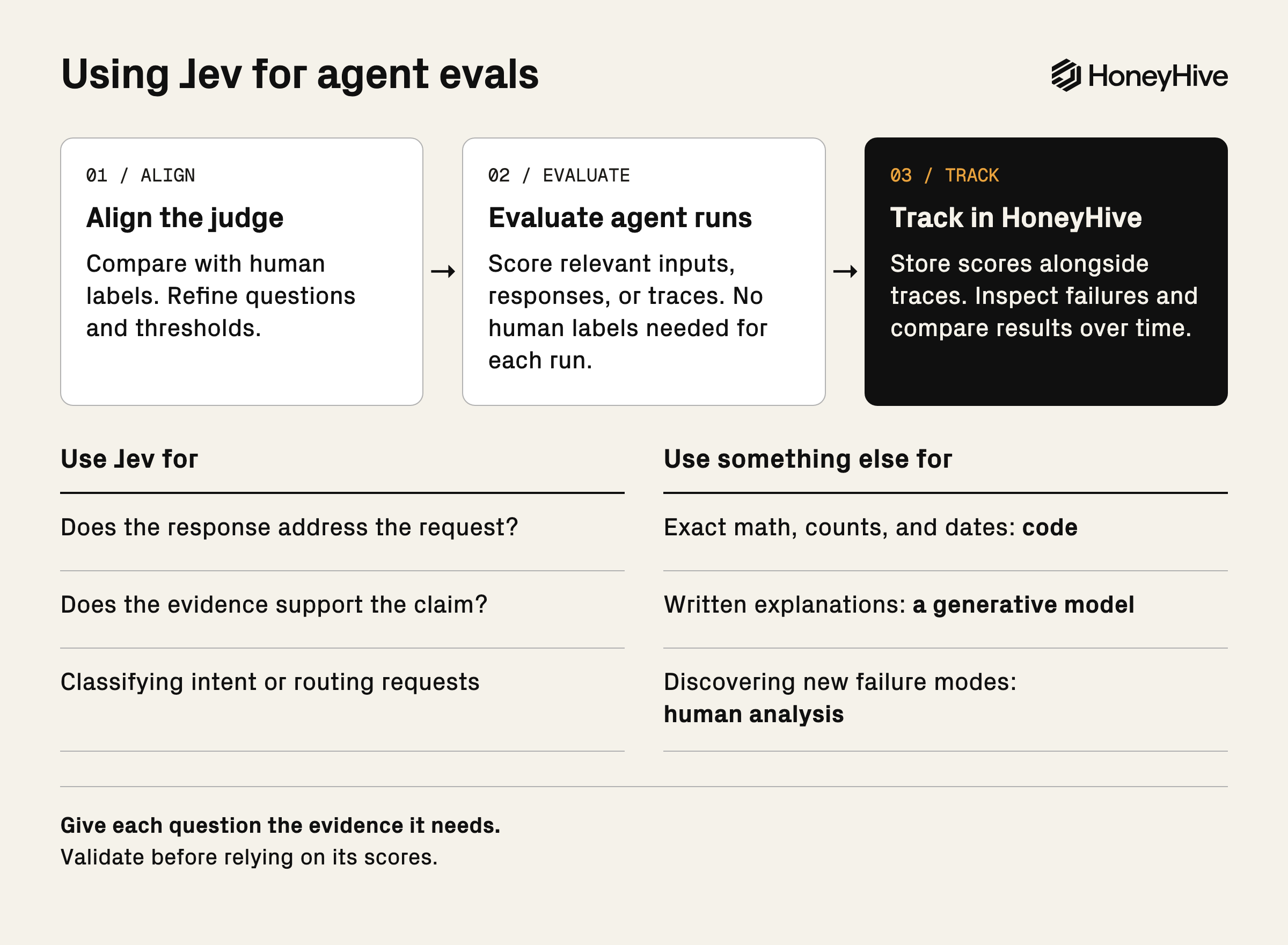
You can use Jev as a client-side evaluator in HoneyHive: a function in your code that sends the relevant inputs, outputs, or trace data to Jev and returns a score. It does not need a reference answer or human label to run. The state only needs to contain the evidence required by the question.
For the support example, the evaluator below scores saved customer messages and agent responses. It returns Jev’s probability that the response addresses the request. Install honeyhive and typesafe-sdk, and set TYPESAFE_API_KEY and HH_API_KEY before running it. HH_API_KEY must be a HoneyHive project API key; an ingestion-only key cannot create experiments.
This example scores saved records. You can also pass an agent function to evaluate() and score its new outputs, or call score_response() during a live run and attach the result to the active span with enrich_span(metrics={"request_addressed": score}). Prepare the state from whichever inputs, outputs, or trace fields the question needs. Keep evaluator and target function names stable when comparing experiments.
Human-label alignment is a separate step to do ideally before you start using Jev for evals. On a labeled dataset, compare Jev’s decisions with labels stored in ground_truth to refine the question and choose a threshold. Once aligned, the same scoring function can evaluate new conversations or traces without human labels. You only need ground_truth when you want that comparison.
To set this up for your own agent, give your coding agent the HoneyHive skills and ask it to inspect your agent. This prompt starts with your agent’s behavior and builds the evaluators around it:
If you want to work through this process on your own traces with us, book a demo.