Tracing RAG applications in production with LanceDB and HoneyHive
.jpeg)
Learn how to trace and evaluate AI applications at scale with HoneyHive and LanceDB.
Modern AI applications face two key challenges: efficiently managing vector data and gaining visibility into performance. LanceDB and HoneyHive together provide a powerful solution by combining a serverless vector database with comprehensive tracing capabilities.
Traditional vector databases require complex server management and lack integrated monitoring. Meanwhile, most monitoring solutions aren't designed for vector search operations. The LanceDB and HoneyHive integration addresses these gaps, offering engineering teams better control over their AI applications.
The Solution: LanceDB + HoneyHive
LanceDB stands out as a developer-friendly, serverless vector database built specifically for AI applications. Its embedded architecture, persistent storage capabilities, and true multimodal support make it an ideal foundation for modern AI applications. Unlike other vector databases that only store embeddings and metadata, LanceDB can store the actual data alongside vectors, simplifying your data architecture.
HoneyHive complements LanceDB perfectly by providing specialized tracing and monitoring for vector database operations. By integrating HoneyHive with LanceDB, engineering teams gain visibility into embedding quality, retrieval performance, and optimization opportunities throughout their RAG pipelines.
What You'll Learn in This Blog
In this comprehensive guide, we'll explore:
- The unique features of LanceDB that make it ideal for AI applications
- How HoneyHive enhances vector database operations through specialized tracing
- Step-by-step implementation of a complete RAG pipeline with LanceDB and HoneyHive
- Performance insights and optimization strategies enabled by this integration
- Real-world benefits for engineering teams and leaders
Whether you're an engineering leader looking to improve your team's AI infrastructure or an engineer seeking to optimize your vector search applications, this integration offers tangible benefits that we'll explore in detail. Let's dive into how LanceDB and HoneyHive work together to supercharge your AI applications.
LanceDB: The Serverless Vector Database for AI
Serverless/Embedded Architecture
LanceDB operates in-process within your application, eliminating the need for separate database servers. This approach offers:
- Zero infrastructure overhead
- Simplified deployment in serverless environments
- Lower latency by eliminating network round-trips
- Reduced operational costs
On-Disk/Persisted Storage
Unlike memory-based vector databases, LanceDB uses disk-based, persisted storage:
- Store billions of vectors without RAM constraints
- Cost-effective scaling with economical disk storage
- Automatic versioning without additional infrastructure
- Data durability across application restarts
True Multimodal Support
LanceDB stores actual multimodal data alongside vector embeddings:
- Text documents, images, videos, audio, and point clouds
- Original content alongside vector representations
- Rich metadata with comprehensive filtering options
- Simplified data architecture by eliminating separate storage systems
HoneyHive: Tracing for Vector Database Operations
HoneyHive provides specialized tracing for AI applications, offering unprecedented visibility into vector operations. When integrated with LanceDB, it enables teams to:
Track Vector Operations
- Monitor embedding generation processes
- Capture query execution paths and performance metrics
- Analyze data ingestion workflows
Monitor Embedding Quality
- Compare embedding model performance
- Track embedding drift over time
- Evaluate dimension choice impact
Evaluate Retrieval Performance
- Measure retrieval latency across query types
- Assess retrieved document relevance
- Compare similarity metrics effectiveness
Identify Optimization Opportunities
- Pinpoint RAG pipeline bottlenecks
- Detect suboptimal index configurations
- Recognize caching opportunities
The Engineering Perspective: Why Tracing Matters
From an engineering standpoint, the addition of HoneyHive tracing to LanceDB operations addresses several critical needs:
- Debugging complex pipelines: Trace the full execution path from query to response
- Performance optimization: Identify and address bottlenecks with precision
- Quality assurance: Monitor retrieval relevance and embedding quality over time
- Cost management: Understand resource utilization and optimize accordingly
- Continuous improvement: Make data-driven decisions about model and parameter choices
As one engineering leader put it: "Before adding HoneyHive tracing to our LanceDB operations, optimizing our RAG pipeline was like flying blind. Now we have a cockpit with all the instruments we need to navigate effectively."
In the next section, we'll explore a complete implementation example that demonstrates how to build a RAG pipeline with LanceDB and HoneyHive tracing from the ground up.
Implementation Guide: Building a RAG Pipeline with LanceDB and HoneyHive
In this section, we'll walk through a complete implementation of a Retrieval Augmented Generation (RAG) pipeline using LanceDB for vector storage and HoneyHive for tracing. This practical example demonstrates how these technologies work together to create a powerful, observable AI application.
Prerequisites
Before we begin, ensure you have the following:
- Python 3.8+
- A HoneyHive account and API key
- An OpenAI API key (for embeddings and LLM generation)
- Basic understanding of RAG pipelines
First, let's install the required packages:
Implementing HoneyHive tracing with LanceDB is remarkably straightforward. The integration uses a decorator-based approach that adds minimal overhead to your existing code.
This simple addition of the @trace decorator provides comprehensive visibility into your LanceDB operations without requiring complex instrumentation or code changes.
Step 1: Initialize Clients and Setup
We'll start by setting up the necessary clients and configuration for HoneyHive, OpenAI, and LanceDB:
Configure logging
Initialize HoneyHive tracer
Set OpenAI API key
This setup establishes logging, initializes the HoneyHive tracer with your project details, and configures the OpenAI client. The HoneyHive tracer will be used to monitor and analyze each step of our RAG pipeline.
Step 2: Define Document Class
Next, let's create a simple document class to hold our text chunks:
This class provides a consistent structure for our documents, including both the text content and associated metadata.
Step 3: Load and Process Documents with Tracing
Now, let's create functions to load and chunk documents with HoneyHive tracing:
The @trace decorator logs these operations to HoneyHive, capturing metadata about document loading and chunking processes. This visibility is crucial for understanding how your data preparation affects downstream performance.
Step 4: Create LanceDB Table with Tracing
Next, let's set up a LanceDB table with embeddings:
This function creates a LanceDB table and adds document chunks with embeddings. The @trace decorator logs information about the embedding model used and table creation process, providing visibility into this critical step.
Step 5: Retrieve Documents with Tracing
Now, let's create a function to retrieve relevant documents from LanceDB:
The @trace decorator logs information about the retrieval process, including the query and number of results. This visibility helps you understand how well your vector search is performing and identify potential improvements.
Step 6: Generate Response with Tracing
Let's create a function to generate a response using OpenAI with tracing:
This function generates a response using OpenAI based on the retrieved documents. The @trace decorator logs information about the generation process, including the prompt construction and response.
Step 7: Complete RAG Pipeline with Tracing
Finally, let's create a function that combines all the previous steps into a complete RAG pipeline:
The @trace decorator logs the entire RAG pipeline process, creating a parent span that contains all the child spans from the individual functions. This hierarchical view in HoneyHive provides a comprehensive understanding of your pipeline's performance.
Step 8: Run the Example
Let's create a main function to run our example:
This implementation uses the @trace decorator to log operations to HoneyHive, providing visibility into each step of the RAG pipeline.
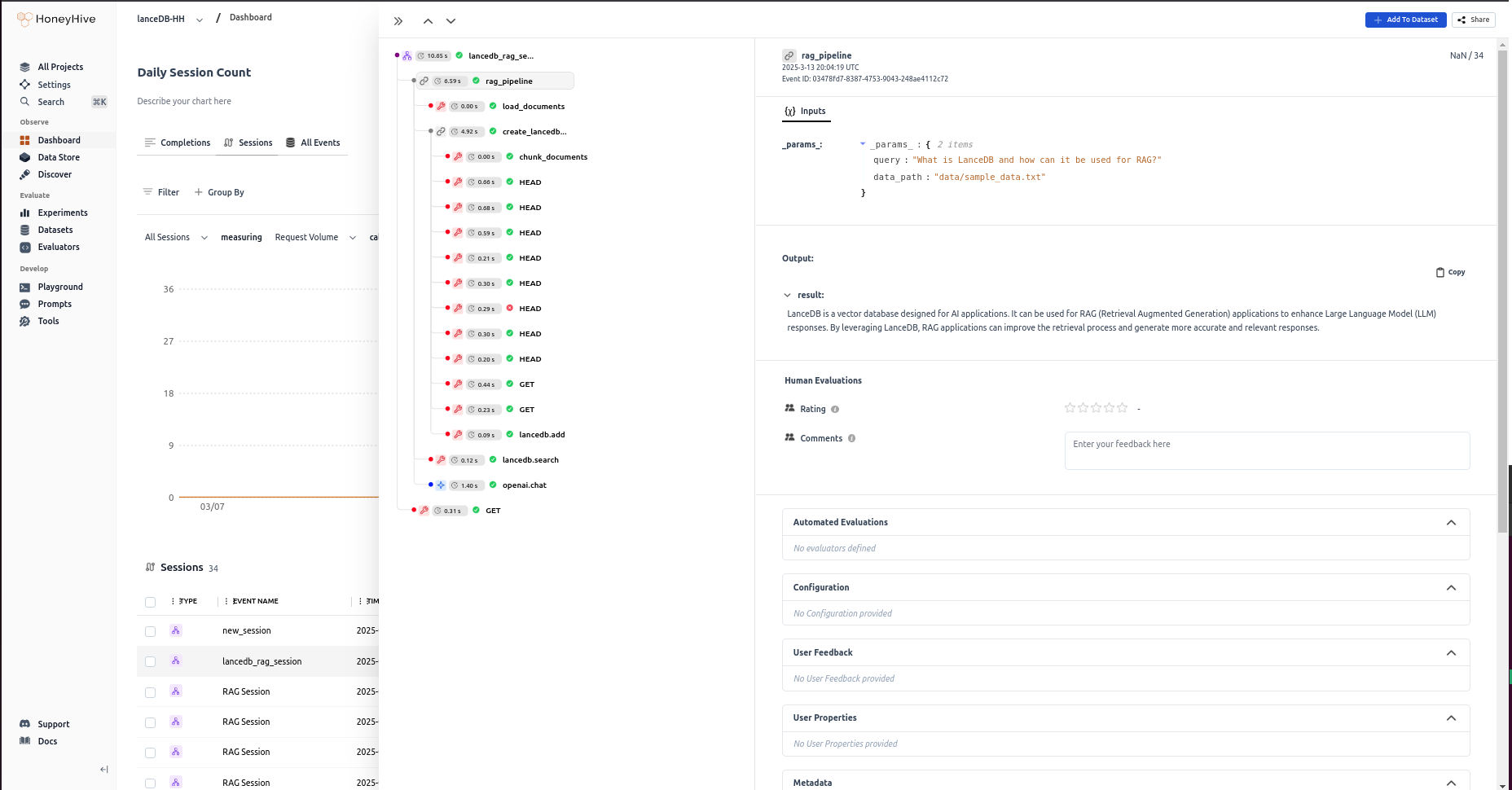
How it helps
The LanceDB and HoneyHive integration offers significant advantages for AI applications:
- Simplified Infrastructure
- The serverless, embedded nature of LanceDB eliminates the need for complex database infrastructure, reducing operational overhead and allowing teams to focus on application logic rather than database management.
- Cost-Effective Scaling
- LanceDB's disk-based, persistent storage approach enables economical scaling to billions of vectors without proportional increases in infrastructure costs—a critical consideration as vector datasets grow rapidly.
- True Multimodal Support
- Unlike traditional vector databases that only store embeddings, LanceDB's ability to store the actual multimodal data alongside vectors simplifies architecture and enables more sophisticated retrieval strategies.
- Comprehensive Visibility
- HoneyHive's specialized tracing capabilities provide unprecedented insights into every aspect of vector operations, from embedding generation to retrieval performance, enabling data-driven optimization.
- Continuous Improvement
- The combination of performance metrics and quality indicators from HoneyHive allows teams to iteratively improve their RAG pipelines based on real-world usage patterns and outcomes.
Real-World Impact
Organizations using this integration have reported:
- Large reduction in infrastructure costs
- Faster and more accurate improvement in retrieval relevance
- 2-3x faster development cycles
- Significant reduction in LLM hallucinations
By combining efficient vector storage with comprehensive tracing, this integration addresses two critical challenges in modern AI applications: data management and performance visibility.
Resources