Introducing HoneyHive v2
Product updates

v2 is a ground-up refactor of the platform, featuring a new architecture, Custom Roles, new Python and TypeScript SDKs, HoneyHive CLI, Trajectories for long-running agents, and more.
Today we're announcing HoneyHive v2 — a ground-up refactor of the platform, and by far our biggest update since GA last year.
v2 is built around the boundary your security team cares about most: the sensitive logs inside agent traces. Traditional observability tools spent years learning to expunge that data. Agent observability has to preserve it verbatim to evaluate against — after all, you can't grade a support agent's reply without the real transcript that prompted it. That changes two things: where this data is allowed to live, and who's allowed to touch it once it's there.
v2 answers both. A new architecture keeps raw logs and eval compute inside your data plane, while the control plane only ever sees non-sensitive metadata. A new RBAC system gates every read, write, and permission change. Together, this is what lets a Fortune 500 company roll HoneyHive out firmwide — across business units, regions, and the most regulated AI workloads in the company.
We’re also introducing new Python and TypeScript SDKs, Trajectories for long-running agents, HoneyHive CLI, and various big and small improvements that make it easier to manage and scale HoneyHive inside an enterprise.
Quickly, what it means for you:
- If you're an existing v1 customer, we've already been reaching out to your admins individually and will migrate you to v2 over the coming weeks. v1 will remain available for 6 months so you have time to update any lingering integrations.
- If you're evaluating HoneyHive for a regulated environment, v2 is the version you've been waiting for. You can deploy on managed SaaS, hybrid, or fully self-hosted, and the data plane scales independently per business unit, region, or tenant.
Why we built v2
When we went GA a year ago, most customers were shipping their first LLM apps from prototype to production. Today, they're running dozens of agents against sensitive workflows like loan underwriting, claims triage, customer support, and fraud detection. The shape of the problem has changed in two ways.
The data inside an agent trace is qualitatively different from anything in traditional observability. To evaluate an agent, you need to preserve LLM payloads and tool calls verbatim — every transcript, PII/PHI/PCI field, privileged communication, and proprietary prompt. This is exactly the data ordinary observability has spent years learning to expunge. And you can’t redact it at ingest either: the sensitive logs are frequently the thing you need in order to evaluate. A support agent’s reply can only be graded against the real transcript that prompted it. Similarly, a fraud agent’s verdict can only be graded against real customer transactions that triggered it. The honest answer is to treat sensitive data as first-class — segregate it inside the customer’s perimeter, run compute there, and gate every read with granular access control. That’s what v2’s architecture and new RBAC model are built around.
Deployments are now federated, not limited to a single team. Enterprise customers are rolling out HoneyHive firmwide — across business units, geographies, and subsidiaries, with each team using different models, agent frameworks, and sometimes no-code agent builders. Platform teams administering HoneyHive need centralized visibility and controls without centralizing the data, and enough flexibility for individual product teams to store their sensitive data as they see fit.
v1 wasn't built for a federated world. v2 is.
The new architecture
v2 splits HoneyHive into a control plane and one or more independently scalable data planes.
The control plane holds metadata about your traces and project structure, evaluator definitions, alert rules, schema catalogue, user identity, and audit logs — but never the input or output payloads themselves. The data plane holds everything sensitive: raw logs — inputs and outputs, proprietary datasets, and the compute that runs evaluators over them.
The key design choice is keeping evaluation compute with the data. Evaluators are defined once in the control plane but fetched and executed inside the data plane, against raw logs that never leave. The same is true of text search, long-form feedback, and any LLM-as-judge or code evaluators — only non-sensitive metric labels and metadata flow upward to the control plane.
You choose where each plane runs:
- Multi-Tenant SaaS — both planes in our cloud, with logical isolation between organizations through virtual data planes.
- Dedicated SaaS — both planes run in a dedicated cluster managed by us.
- Hybrid — one or more data planes in your own environment; connected to a shared or dedicated control plane managed by us.
- Self-hosted — the whole stack inside your perimeter.
Teams that want logical isolation without the operational cost of multiple physical deployments can also partition a single data plane into virtual data planes, each with its own governance rules and security policies.
What this gets you
- Deployment flexibility. Start on managed SaaS with logical isolation, easily self-host a single data plane within your own VPC when a regulated workload lands. Self-host the entire stack when even metadata needs to stay inside your perimeter.
- Smaller blast radius. A compromised control plane exposes structure and aggregate metrics but no customer content. A compromised data plane exposes only the workspace or region it serves.
- Noisy-neighbor isolation. Each data plane runs its own compute and ingestion, so a traffic spike or service downtime in one business unit stays contained there instead of degrading what other teams depend on.
- Faster query times. Control plane queries to Clickhouse no longer contain raw logs, which makes v2 ~2x faster than v1 over large queries.
Battle-tested in production
A Global Top 10 bank has been running on HoneyHive v2 for the past several months. The AI platform team uses HoneyHive to give dozens of teams a shared foundation for AI observability and evals — while keeping each team's data inside its own isolated data plane. Adoption has grown steadily across business units and subsidiaries globally without the usual friction of onboarding new infrastructure and self-hosting duplicate versions of the entire stack, because the architecture and privacy model finally matches how a large organization is actually structured.
Enterprise governance
Segregating sensitive payloads inside a data plane is half the problem. The other half is who’s allowed to read what once it’s there — and at what scope. v2’s governance model gives platform and security teams enterprise-grade control over both questions, with permissions defined at the action level and identity scoped at every layer of the hierarchy.
Workspaces
v2 introduces a new layer between organization and project, giving you a three-level hierarchy: Organization → Workspace → Project. Each workspace has its own AI provider keys, access controls, and data boundary — so the ML platform team, a product team, and the compliance team can work independently under one organization. One workspace per business unit, region, or functional domain is the common pattern, and each workspace can bind to its own data plane.
Credentials for OpenAI, Anthropic, Azure OpenAI, Bedrock, Gemini, and Vertex AI have moved from the organization down to the workspace. A compromised key now affects one workspace rather than the whole org, each team can pick the provider that fits without org-wide coordination, and because usage tags back to the issuing workspace, cost attribution maps directly to the team that owns the spend.
Custom Roles and Granular Permissions
Permissions are defined at the action level — reading traces, creating evaluators, managing secrets, inviting members, and dozens more. Permissions are grouped into permission sets, and roles map to one or more sets. Roles exist at the organization, workspace, and project scope. Enterprises can author their own permission sets, compose custom roles, and configure inheritance — including restricting it, so an org admin doesn't automatically get access to a project's traces without being explicitly granted it.
Identity syncs from your IdP (Okta, EntraID, Google, PingSSO) via SAML groups with JIT provisioning.
Platform API keys at every level
HoneyHive's own API keys are now scoped by the action they're allowed to perform. Organization admin keys are used for org-level configuration. Workspace keys authorize workspace-level admin actions — managing members, providers, data planes. Project keys handle the high-volume, low-privilege work: instrumenting traces, running evals, pulling data. You can hand project keys to every service and CI runner without worrying that one of them can alter your org's identity or billing settings.
Organization templates
AI governance and risk teams can now define a standard set of evaluators and monitors once, and have them populate automatically in every new workspace and project. That enforces consistent quality and compliance without policing every team individually, while individual teams retain the flexibility to define domain-specific custom evaluators inside their projects.
Usage reports
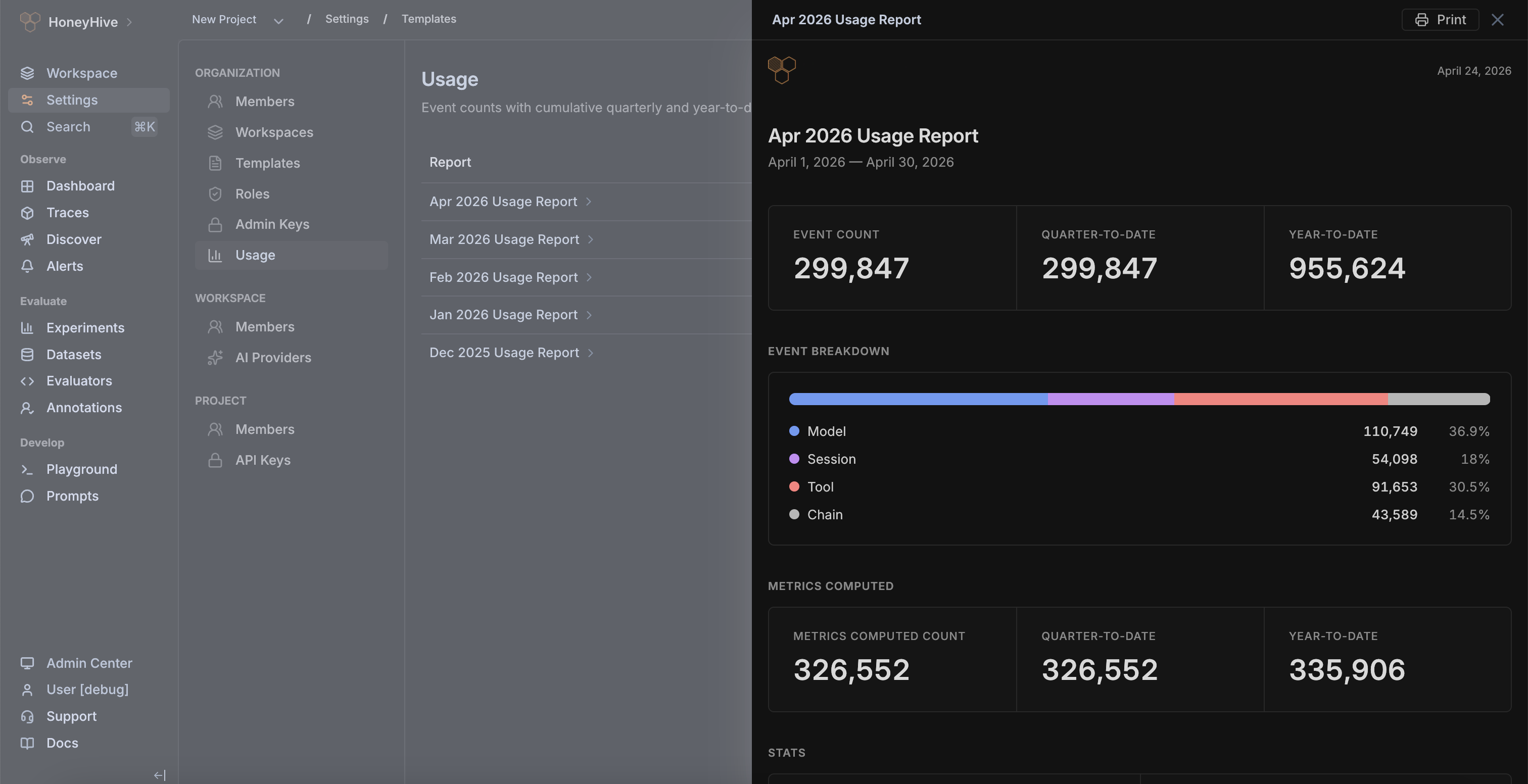
A new Usage page in Organization Settings gives admins visibility into event consumption across the whole org: monthly and quarterly event counts, enrichment metrics (how many events have been scored by evaluators), cumulative QTD and YTD totals, and a per-period breakdown by event type. Reports export to JSON or CSV, and each period has a printable detail view for internal reviews.
Developer experience
DX is a first-class concern in v2. The teams instrumenting HoneyHive are spread across different stacks, package versions, and frameworks — and increasingly, they're working through coding agents rather than writing integration code by hand. v2 rebuilds the surfaces engineers touch every day: new Python and TypeScript SDKs with a pluggable-instrumentor model, first-class integrations for the major agent frameworks, a normalized OTel semantic convention that spans the three major standards, and new tooling that works from the IDE, terminal, or inside an agent loop.
New Python and TypeScript SDKs
The new Python SDK has a small core with pluggable instrumentors. Rather than bundling tracing for every AI package we might support, you install the instrumentor that matches your stack — OpenLLMetry, OpenInference, or an internal one mapped to a specific integration. Dependency conflicts go away — for example, different services can run different LangGraph or OpenAI versions without fighting over pins — and the core is small enough to fit comfortably inside any runtime environment. Because instrumentors are OTel-based, the SDK plugs into collectors you already run — you can export spans to HoneyHive and to your internal backend from the same instrumentation.
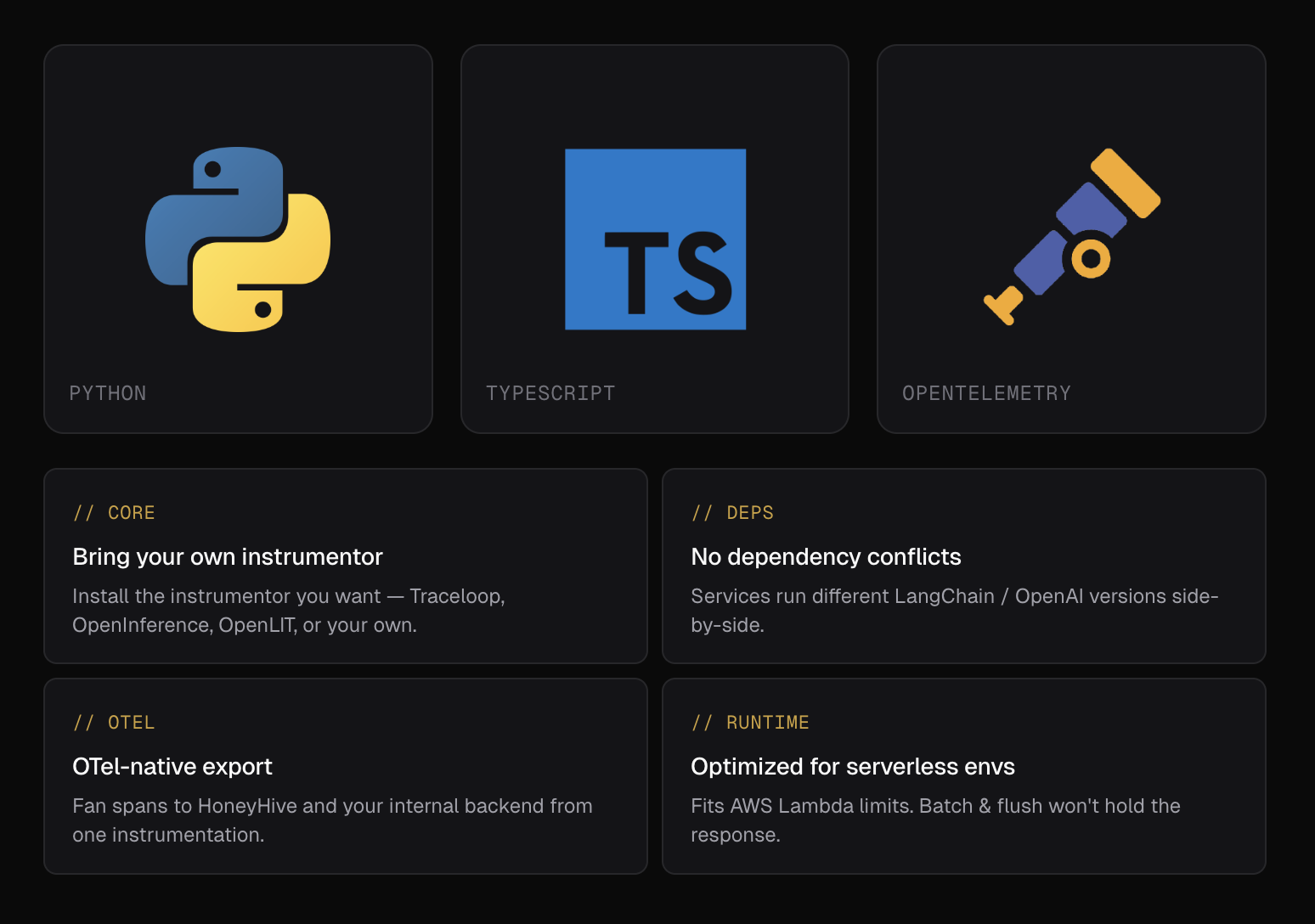
The TypeScript API SDK is the first of several new TypeScript SDKs that provide a more modular approach to interacting with HoneyHive. It's a lightweight wrapper around the HoneyHive REST API. A higher-level tracing SDK with the same pluggable-instrumentor model is coming next, built on top of the API SDK — so you get to choose the abstraction level you prefer to work at.
New Integrations
The new Python SDK ships with new first-class integrations for the major agent frameworks teams are building on today: the Claude Agent SDK, OpenAI Agents SDK, Google ADK, AWS Strands Agents, and more. Each integration captures the framework's native trace structure — tool calls, sub-agent invocations, retrievals, and model calls — and maps it cleanly onto the HoneyHive semantic convention. Evaluators, dashboards, and alerts you build against one framework work identically against another, and teams mid-migration between stacks can run both in parallel and compare them side by side on the same metrics.
HoneyHive semantic convention
Agent frameworks are moving faster than the semantic conventions meant to describe them. The three major OTel semantic conventions today — the official OpenTelemetry GenAI convention, OpenLLMetry, and OpenInference — all disagree on attribute names, event structure, and the shape of tool-call and retrieval spans. Picking one locks you into its framework; running multiple leaves you with traces that can't be evaluated consistently.
HoneyHive ingests all three major OTel semantic conventions and normalizes them into a single consistent semantic convention, with canonical mappings where the conventions diverge. You can build evaluators, dashboards, and alerts on that normalized surface, and they keep working when a team switches frameworks or when two agents on different stacks need to be compared side by side. As the underlying conventions converge, our normalization layer converges with them.
Trajectories
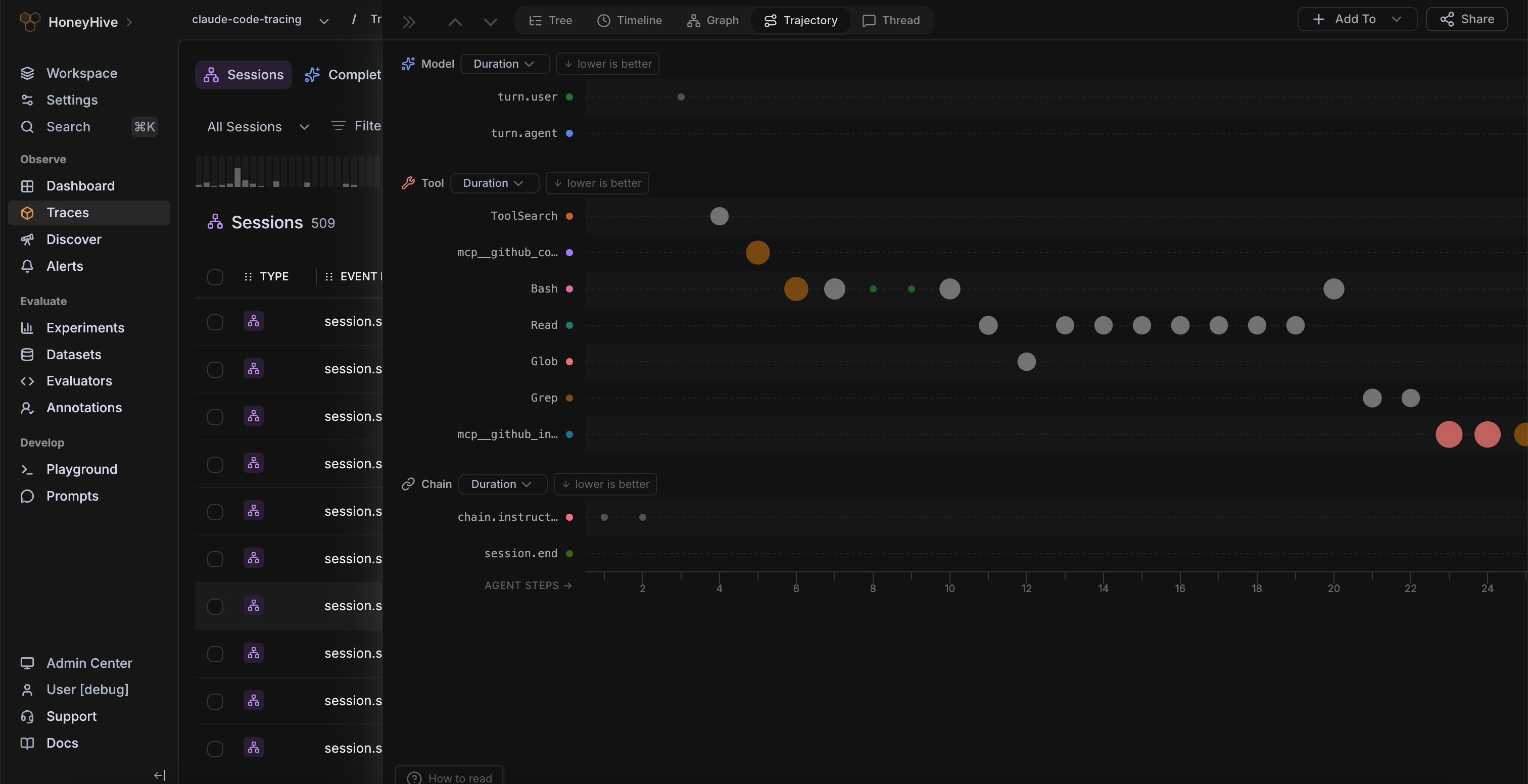
Long-running agents that execute hundreds or thousands of steps across tools, retrievals, and sub-agent calls are hard to inspect with a conventional tree view. The new Trajectory tab gives you a visual fingerprint of an entire agent session on a single screen: each span renders as a bubble on a category-by-step grid, sized by a metric you pick (duration, cost, or an evaluator or feedback score) and colored by relative performance. Behavioral patterns, stuck loops, and tail-latency steps show up as shapes rather than rows you scroll through — which makes sessions at this scale much easier to navigate.
CLI, Skills, and Docs MCP
v2 also introduces new developer surfaces for working with HoneyHive from your IDE, terminal, or using coding agents. The HoneyHive CLI gives teams full API access for scripting workflows, managing configuration in CI, and allowing coding agents to use the full HoneyHive platform programmatically.
We’re also publishing ready-made agent skills and a Docs MCP, so agents in Claude Code, Cursor, GitHub Copilot, Codex, and similar tools can set up tracing and evals, create evaluators, and investigate production alerts without leaving the development loop.
New documentation
We used the v2 release as an opportunity to overhaul our docs. They cover everything you need to get started with HoneyHive v2, and include a full v1 → v2 migration guide for existing customers.
Migration and Availability
v2 will be rolling out to users over the next week. To get early access, talk to our team.
Existing customers will be migrated to v2 endpoints over the coming weeks. v1 will remain available for 6 months after migration to give you time to update any remaining integrations. We've already been reaching out to admins individually with timelines and the migration guide. If you'd like to move sooner, or want to discuss a self-hosted or hybrid deployment, get in touch with your account team.
What's next
v2 is a foundation we’ll continue building upon over the coming months. The immediate roadmap focuses on three areas:
- Coding agent integrations (beta). First-class integrations with Claude Code and Devin are in beta now — bringing the same observability and evaluation story to coding agents that v2 brings to production agents. Talk to your account team for access.
- Improved online evaluations. A new evaluation service offering more customization and the ability to run evals across full session context for trajectory-level analysis.
- A higher-level TypeScript SDK built on OpenTelemetry, matching the Python pluggable-instrumentor model.
If v1 was for a single team shipping their first LLM apps from prototype to production, v2 is for enterprises scaling hundreds of agents in production across teams.
Huge thanks to every customer and design partner who spent time in the RC and pressure-tested the federation model before anyone else did. We can’t wait to see what you build on it!
Share