Trace and evaluate Microsoft Copilot Studio agents with HoneyHive

HoneyHive now brings full tracing and evaluation to Microsoft Copilot Studio.
HoneyHive now brings full tracing and evaluation to Microsoft Copilot Studio.
Copilot Studio makes it quick to build an agent and get it into production, and it sends rich telemetry to Azure Application Insights along the way. HoneyHive turns that telemetry into something you can debug and score: each conversation becomes a full trace tree with the user's input, the agent's response, any errors, and every step in between. It's the same evaluation and tracing layer we give teams building custom AI applications, now for the agents you build on Copilot Studio.
Did this conversation resolve, or did the user give up? Where did the agent's reasoning break down? Has quality drifted since last week? Those answers live in the trace and evals on HoneyHive.
No changes to your agent
The integration takes no work inside Copilot Studio beyond turning on telemetry. Copilot Studio is already sending events to Application Insights, and HoneyHive picks them up from there, so the agent itself stays exactly as your team built it.
Nothing changes on the canvas. The people building agents keep working in Copilot Studio, and the team responsible for quality gets production traces in HoneyHive.
What you get
Inside HoneyHive, each conversation is a session your team can actually work with:
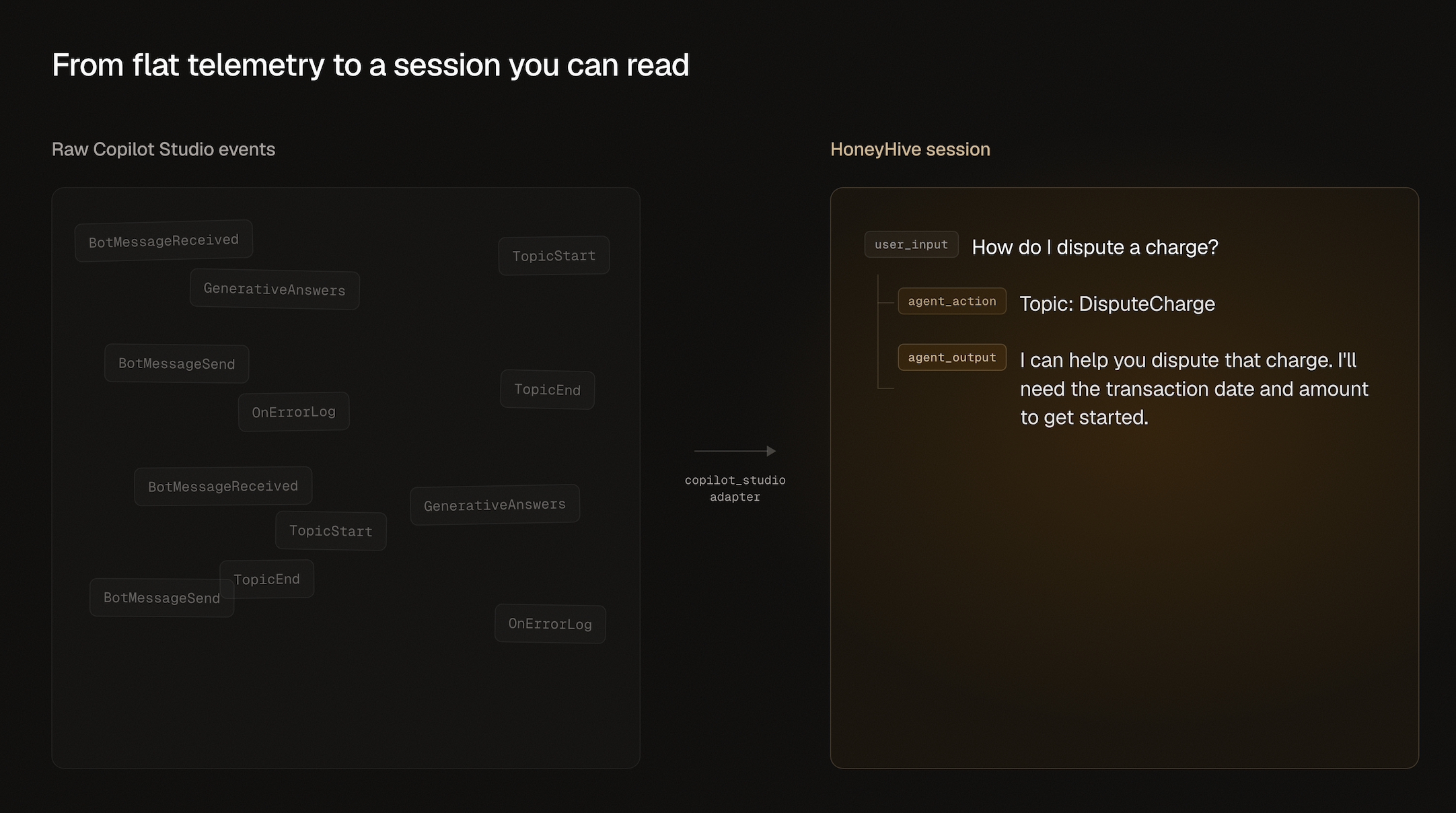
- Each conversation as a session. A conversation shows up as one session, with the user message, the agent response, and intermediate actions as spans in a single trace you can step through.
- Evaluation on real traffic. Run evaluators over those sessions, build datasets from real conversations, and track quality over time instead of reading aggregate counts.
- One place across your agents. Copilot Studio agents sit next to your code-built ones, so a platform team watching agents from LangGraph, Semantic Kernel, or a custom OTLP pipeline sees Copilot Studio in the same view.
Production agents need production oversight
Copilot Studio is already at enterprise scale. Microsoft reports that nearly 90% of the Fortune 500 have built agents with its low-code agent tools. Many of those agents run in regulated settings like banking and insurance, where an agent that drifts or mishandles a request carries real risk. HoneyHive gives the teams accountable for those agents a way to see what they do across conversations, monitor quality at scale, and catch issues before they reach users.
How it works
You don't instrument the agent. You forward the telemetry it already sends to Application Insights.
.png)
A small Azure Function, triggered by the Event Hub, forwards each record to HoneyHive's OpenTelemetry endpoint as conversations happen rather than on a batch polling schedule. The Copilot Studio adapter converts each record into a span and maps Copilot Studio events to HoneyHive event types so each conversation reads cleanly:
| Copilot Studio event | HoneyHive event | Captured as |
|---|---|---|
BotMessageReceived
|
user_input
|
the user's message |
BotMessageSend
|
agent_output
|
the agent's response |
OnErrorLog
|
agent_error
|
error status and type |
| Topics, generative answers, and so on |
agent_action
|
intermediate steps |
Every conversation becomes a single session, and the event name is what tells a user turn apart from an agent response or an intermediate action.
Getting started
Setup is light: a single Azure Function, an Event Hub, and a few application settings. The adapter handles trace correlation and session grouping for you. The Copilot Studio integration docs walk through connecting Application Insights, streaming the diagnostic export to the Event Hub, and deploying the forwarder.
Some of these steps happen in the Azure portal and the Copilot Studio UI. A coding agent can still do most of the work: scaffold the Azure Function forwarder and walk you through the portal steps as you go. Point it at the integration docs and have it set things up with you:
Help me set up HoneyHive tracing for my Microsoft Copilot Studio agent, following https://docs.honeyhive.ai/v2/integrations/copilot-studio. Scaffold the Azure Function forwarder and walk me through the Azure and Copilot Studio steps interactively.
What's next
The adapter is available in the honeyhive Python SDK today. If you're running Copilot Studio agents and want to evaluate them the way you'd evaluate a code-built agent, read the integration docs or book a demo and we'll walk through it on your setup.